Desktop Prototype Website FAQ

You need to allow screen recording permission for Google Chrome.

1. Click on the “Apple icon” from the left top of the screen

2. Open System Preferences, click the “Security and Privacy”
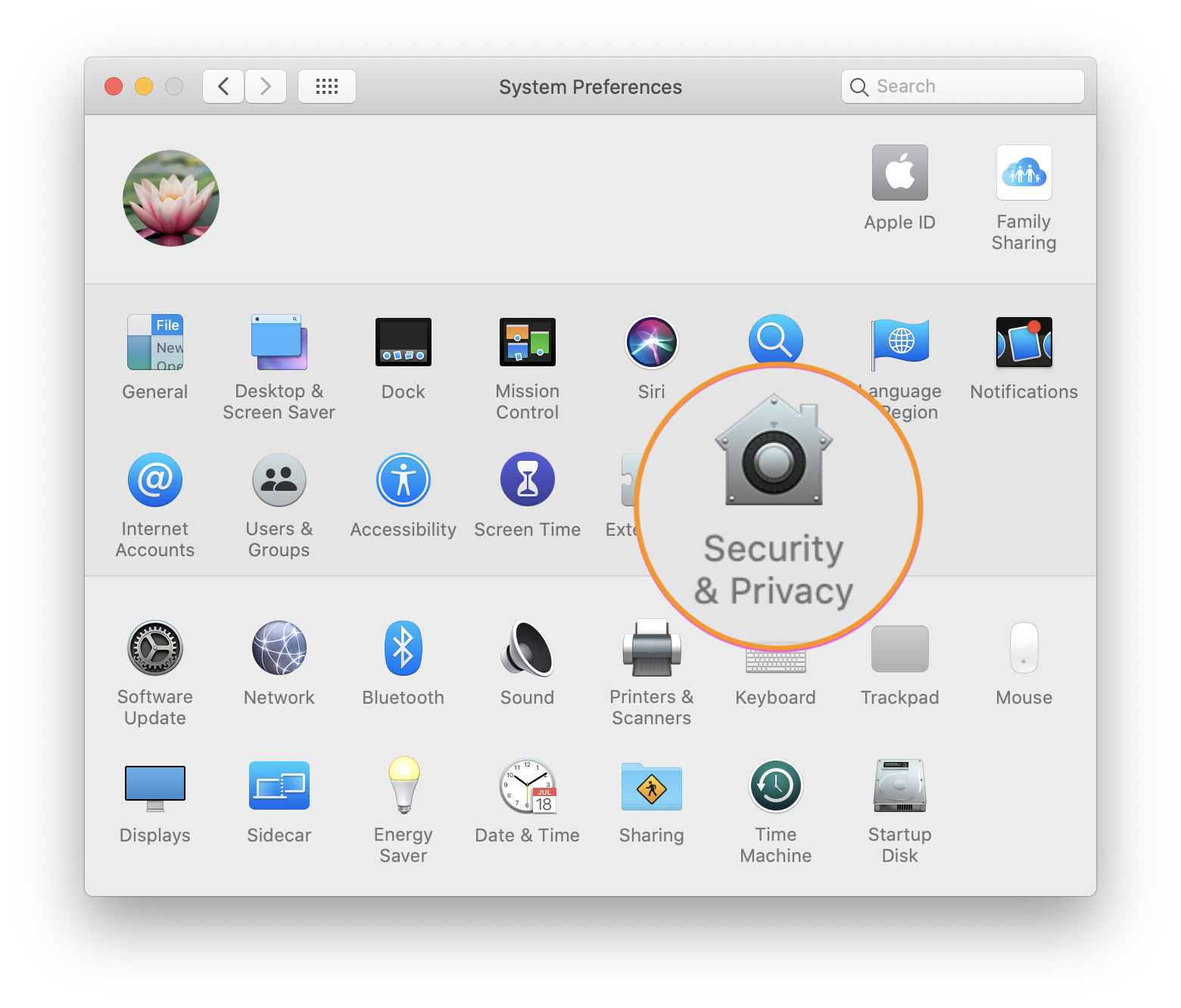
3. Find the “Screen Recording” section, click the box next to Google Chrome to allow Screen Sharing. You may need to click the unlock icon in the bottom-left.

4. Next, click “Quit Now”. Quit and restart Google Chrome, now you’re ready to take the test.
Yes, only once! You’ll be prompted to download the UserAdvocate Extension into the Google Chrome browser on your computer when you start the User Study.

Not at the moment. We are still building support for other browsers.

Yes, The purpose of a user study is to understand your usability feedback of the Website in the best way possible. Voice feedback along with Screen Sharing helps us to make meaningful conclusions about the Design shortcomings and things that you like/dislike about the test Website. So, We strongly recommend you allow this permission to increase your chances of getting rewarded. A submission without any voice feedback is most likely to get disapproved by our client, and you will be requested to re-take the test.

Try the following steps as recommended by Google:

Change a site’s camera & microphone permissions

  1. Open Chrome.
  2. At the top right, click More and then Settings.
  3. Under “Privacy and security,” click Site settings
  4. Click Camera or Microphone.
  5. Turn on or off Ask before accessing.
  6. Review your blocked and allowed sites.
  7. To remove an existing exception or permission: To the right of the site, click Delete.
  8. To allow a site that you already blocked: Under “Blocked,” select the site’s name and change the camera or microphone permission to “Allow.”

If you’re using a Chrome device at work or school, your network administrator can set camera and microphone settings for you. In that case, you can’t change them here.
Learn about using a managed Chrome device..

No, we don’t support Private window / Incognito mode to take the user study.

No. For user’s security reasons, Google doesn’t allow any extension to work in Guest account.